TL;DR
- North Carolina court-ready forms are now live in SecureSplit®, including the state’s child support worksheets and Wake County’s financial affidavit and equitable distribution inventory affidavit.
- The forms fill in from the case file: party names, the children, and figures from a saved North Carolina child support calculation.
- Firms and enterprises get a simpler payment and onboarding flow, so a whole team can get set up without a long back-and-forth.
- White labeling launches November 12. Plaid, Google Drive, and a new Vault tool follow in the next release, planned for December 1.
The SecureSplit® team ships product updates in sprints and posts what changed in the release notes. This one, Phase 3, Sprint 9, went live on November 3, 2026.
It’s a smaller release than the last one, which finished state-specific support calculators for all 50 states. But it covers two things professionals ask about constantly. North Carolina practitioners can now produce court-ready forms from the case they already built. And firms can get a full team on the platform without the payment and setup friction that used to slow them down.
What’s New in This Release?
This release adds North Carolina court-ready forms and an upgraded payment and onboarding flow for firms and enterprises. It also completes the foundation work for white labeling and Plaid integration, which are next in line.
| Update | Who it’s for | Status |
| North Carolina court-ready forms | Anyone working a North Carolina case | Live |
| Upgraded payment and onboarding flow | Firms and enterprises | Live |
| White labeling | Firms that want their own branding | Launching November 12 |
| Plaid, Google Drive, and the new Vault tool | All professionals | Planned for December 1 |
North Carolina Court-Ready Forms Are Live
SecureSplit® now generates North Carolina court-ready forms from the data already in a case. Open a North Carolina case, go to Court Ready Forms, and pick the form you need. When you save, SecureSplit® creates the PDF and adds it to the case Vault automatically.
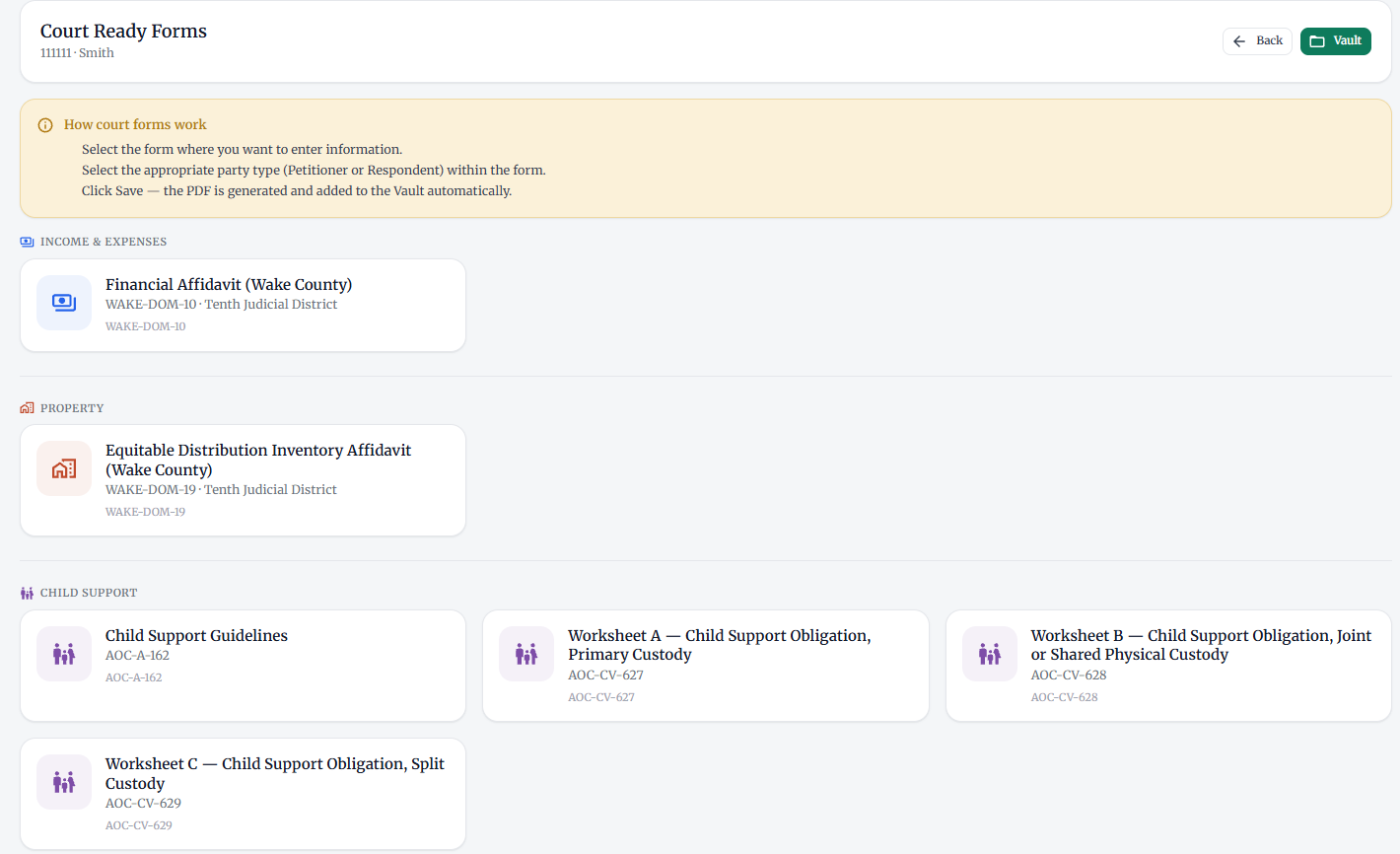
The forms are grouped the way you’d use them on a case:
- Income and expenses: Financial Affidavit (Wake County), WAKE-DOM-10.
- Property: Equitable Distribution Inventory Affidavit (Wake County), WAKE-DOM-19.
- Child support: the Child Support Guidelines (AOC-A-162), Worksheet A for primary custody (AOC-CV-627), Worksheet B for joint or shared physical custody (AOC-CV-628), and Worksheet C for split custody (AOC-CV-629).
The two Wake County forms are local forms for the Tenth Judicial District. The child support worksheets are statewide forms from the North Carolina Administrative Office of the Courts.
How do the North Carolina forms fill in?
Each form pulls from the case you’ve already built, so you aren’t retyping the same names and numbers into a PDF. On Worksheet A, for example:
- The plaintiff and defendant come straight from the case parties.
- The children and their dates of birth come from client intake. The form has room for six.
- The child support lines fill in from your saved North Carolina child support calculation, and you can correct any figure.
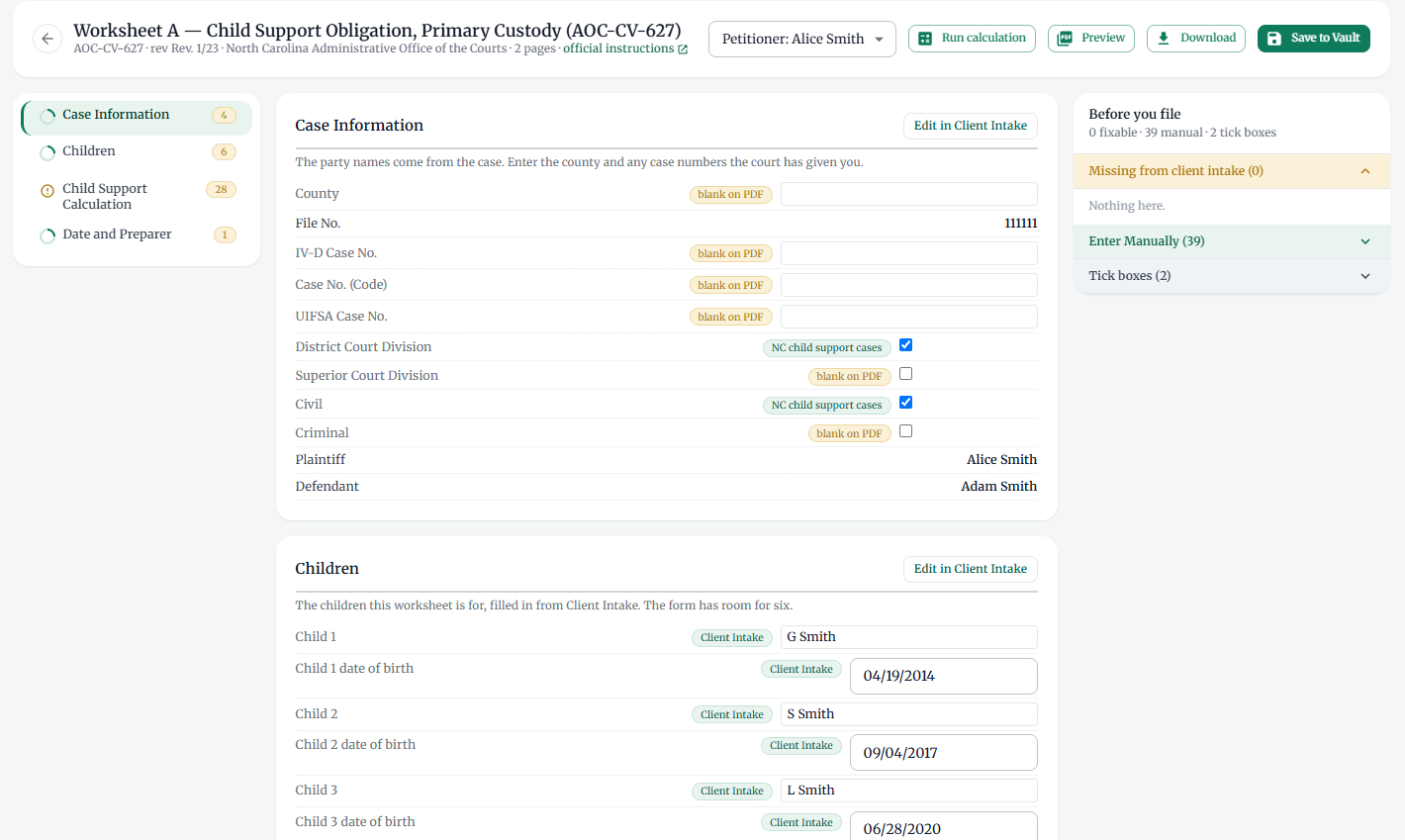
A “Before you file” panel sits next to every form. It lists anything missing from client intake, the fields you still need to enter by hand (like the county and court file numbers), and the tick boxes to check. You can preview or download the PDF at any point before you save it to the Vault.
Pro Tip: Run and save the North Carolina child support calculation before you open the worksheets. Worksheet A is for cases where one parent has the children 243 nights a year or more. If your calculation used Worksheet B or C instead, Worksheet A’s calculation lines stay blank, which is the right result.
SecureSplit® already offers state-specific child and spousal support calculators in all 50 states. North Carolina forms build on that work: calculation and filing prep now happen in the same place for North Carolina matters.
A Simpler Payment and Onboarding Flow for Firms
Firms and enterprises now have an upgraded payment and onboarding flow. It makes it easier for a firm to sign up, onboard its team, and get started at scale, and it supports customized setups across organizations.
That matters because a firm buys differently than a solo practitioner. There are more seats, more people to set up, and often a billing process that runs through someone other than the person who’ll use the software.
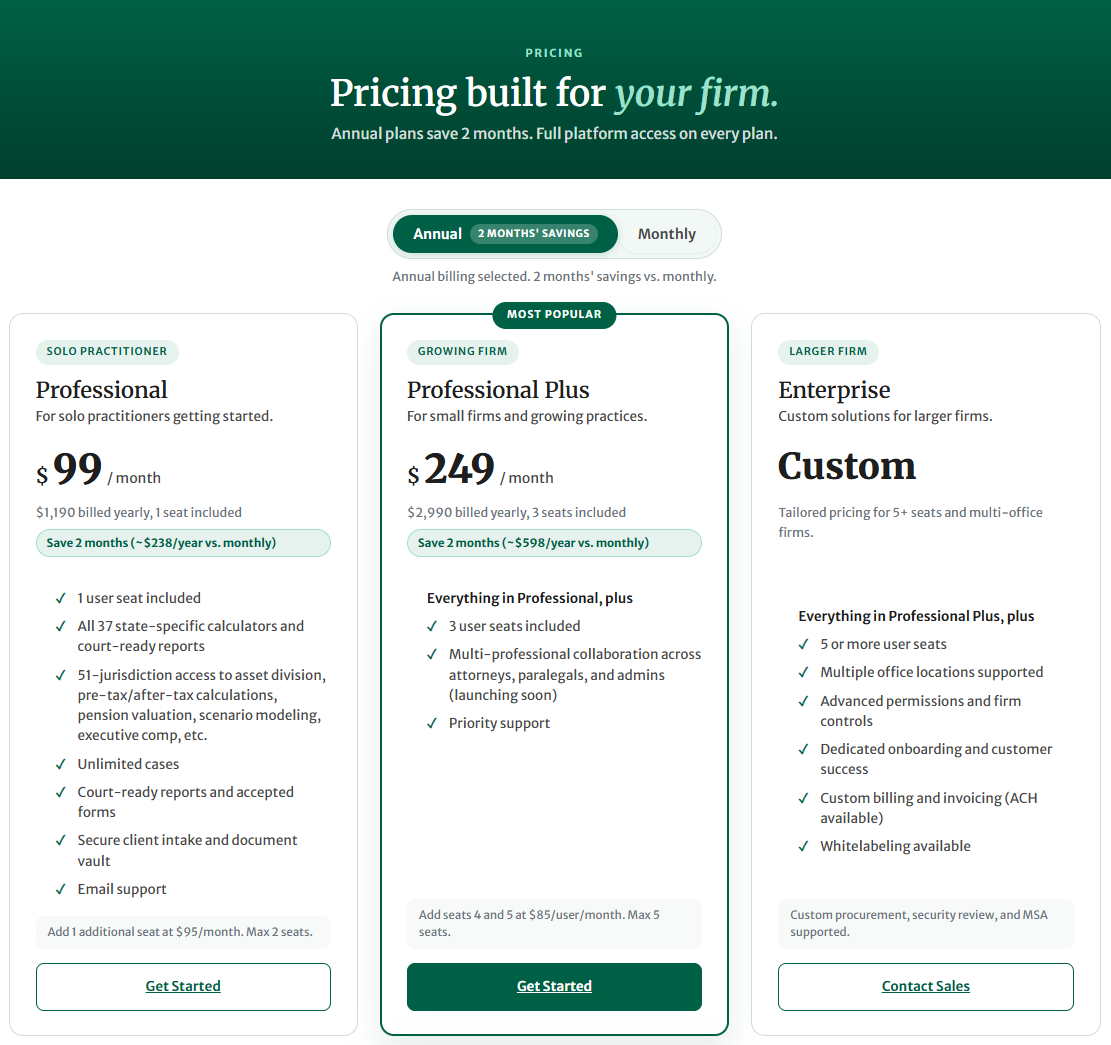
Here’s how the two firm plans compare:
| Professional Plus | Enterprise | |
| Built for | Small firms and growing practices | Larger and multi-office firms |
| Seats | 3 included, seats 4 and 5 at $85/user/month | 5 or more |
| Firm controls | Firm admin and shared case access | Advanced permissions and firm controls |
| Onboarding | Self-serve, with priority support | Dedicated onboarding and support |
| Billing | $2,990 billed yearly (about $249/month), or $299 month to month | Custom billing and invoicing |
Full details are on the pricing page. If your firm is bigger than five seats, or you need your compliance team to review the platform first, book a demo and the team will walk through it with you.
What’s Coming Next?
The next release, Phase 3, Sprint 10, is planned for production on December 1. White labeling arrives earlier, on November 12. Foundational development for both white labeling and Plaid integration is complete.
- White labeling (November 12). Show your firm’s logo with “Powered by SecureSplit®,” apply your firm’s brand colors across the platform, and add firm-specific disclosures, terms, or client messaging.
- Expanded Plaid integration. Import and sort income, retrieve and sync asset account data, import liabilities such as loans and credit cards, capture ongoing expenses, and securely access account statements.
- Google Drive integration. Connect Google Drive with OAuth, import files and attach them to cases, and save documents back to Drive, with SecureSplit® access controls and the audit trail still in place.
- New Vault tool. Custom folders and bulk uploads, tagging and search, links between documents and the financial records they support, secure external sharing with expiring links, version history, document requests, and an activity log.
Key Insight: Release dates can move as features go through testing. The release notes are always the current record of what’s live.
Frequently Asked Questions
Which North Carolina court forms does SecureSplit® support?
SecureSplit® supports the North Carolina Child Support Guidelines (AOC-A-162), child support Worksheets A, B, and C (AOC-CV-627, 628, and 629), and two Wake County local forms: the Financial Affidavit (WAKE-DOM-10) and the Equitable Distribution Inventory Affidavit (WAKE-DOM-19). Each one fills in from the case file.
Do the North Carolina forms fill in automatically?
Mostly. Party names come from the case, children come from client intake, and the child support lines come from your saved North Carolina child support calculation. You still enter items the court assigns, such as county and file numbers. A “Before you file” panel lists exactly what’s left.
Where do the completed forms go?
When you save a form, SecureSplit® generates the PDF and adds it to the case Vault automatically. You can also preview or download the PDF before saving.
What changed for firms and enterprises?
This release adds an upgraded payment and onboarding flow for firm and enterprise accounts. It makes signing up and onboarding a team easier and supports customized setups across organizations. Professional Plus covers small firms with three included seats, and Enterprise covers five or more seats and multiple offices.
When is white labeling available?
White labeling is scheduled to launch November 12, 2026. It lets a firm display its own logo with “Powered by SecureSplit®,” use its brand colors, and add firm-specific disclosure wording. Check the release notes for the latest status.
See It on Your Next Case
North Carolina professionals can now handle intake, support calculations, and court-ready forms in one place. Firms can bring the whole team on without the setup slog. If you want to see either one with your own type of case, book a 30-minute demo, or start with a plan that fits your firm.